Showing posts with label firmware upgrade. Show all posts

Tuesday, 4 June 2013

Gibson RIP - Echo Audio Software and UPDATING to Firmware V.5.80

While I was "in the mood" for performing updates;  I checked in with ECHO-AUDIO to see if any updated drivers / firmware were released for the Gibson RIP interface; (Robot Interface Pack - aka RIP) for my Dusk Tiger.


The GIBSON website is *AWFUL* and is RARELY updated with newer packages, so its' best to do this yourself.

Listed, there was an update from January 2013 - Version 5.8...  I was running the previous version 5.7.x (from Jan 2012), so time for an update.... me thinks !!!

"In case you are wondering, the RIP is a product of Echo Digital Audio, which introduced its first sound card for PCs over 20 years ago.   The company now makes a complete line of audio interfaces for Mac and Windows computers; RIP can run concurrently with other Echo Digital Audio devices (..or for that matter - any ASIO interface) if you want to expand the total amount of inputs and outputs."

The Gibson RIP interface (Firewire 400) is mainly used (in conjunction) with the Gibson Robot Software bundles such as the Gibson Chameleon Tone Editor, modifying presets, tone, 4 band EQ and tunings, and for performing firmware upgrade of the guitar itself !


Nice video here >>>>>  Gibson Chameleon Editor - VIDEO

The Robot Interface Pack (RIP) can send all "Dusk Tiger" signals (magnetic pickups, piezo pickup, and hex pickup) into the computer for recording purposes, or directly out for live performances.

PLEASE NOTE : There are TWO versions of the RIP interface - one with POWER / CHARGING (For the Gibson DARK FIRE) - and one without POWER / CHARGING (Indicated by a BLUE dot on the bottom of the UNIT);

The one with the BLUE dot is for the DUSK TIGER - as the battery pack is removable and chargeable using the supplied BATTERY CHARGER (and two batteries);  whereas the DARK FIRE required the guitar to be plugged in (to be charged for use).

It's very cool actually !!!!!!!!

Anyway................  head over to Echo - and download the latest software pack v.5.8


1) Download and run the "SetupEchoFireWire_5.8.exe"

2) Once updated - run the "Echo Firewire Console" - and choose the "SETTINGS" tab, and then "ABOUT.."

You can choose "Copy to Clipboard" and save these details for later.

Here is my RIP - with version 5.8 software - but you will notice that the FIRMWARE (ARM firmware) is still an older version - e.g. Version 5.7.3)

WDM driver 5.8
ASIO driver 5.8
Console 5.8.1
ARM firmware 5.7.3
FPGA 1.0.5

3) So, we need to update the RIP firmware - OK?

- Open Echo Firewire Console - Settings, ABOUT - and choose "Update RIP"

The device will run through a number of firmware steps (Check, Erase, Write // Verify)

When FIRMWARE is upgraded - power off / power on RIP

4) Now - Open "Echo Firewire Console" - Settings, ABOUT.......

Your RIP should now be ARM firmware version 5.8 to match the Firewire Console Version e.g. 5.8

WDM driver 5.8
ASIO driver 5.8
Console 5.8.1
ARM firmware 5.8
FPGA 1.0.5
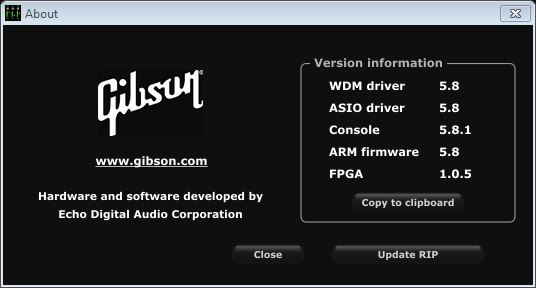
..and a nice little screenshot (HAPPY DAYS !) - another day, another firmware upgrade..........


Thursday, 23 May 2013

Setting up the AXIOM AIR 25

So there is nothing more satisfying than opening a box with your new "thing" inside it......

For me, yesterday was all about setting up the AXIOM AIR 25........  and getting hands-on with it.

..but before the FUN can begin - you have to do some work first.....

Namely.......

1) Register your Controller / Keyboard to obtain the M-Audio (AirMusicTech) IGNITE software Download.     REGISTER at http://www.airmusictech.com/download-ignite

When you have completed registration - the software download LINK is emailed to you.

The version of IGNITE that I received was Version 1.1.1 (This requires you to FIRSTLY update the Firmware of your AIR 25 to Version 1.1 Firmware).  IGNITE is quite a large download around 860MB.......  and supplied as a single ZIP file.


2) From the M-AUDIO website - you will also need.............

  • Device Drivers for Windows (Version 1.0.2[PC])
  • FIRMWARE Update (Version 1.1)
    • NOTE : There are TWO versions x86 (32 bit) and x64 (64 Bit) Firmware Upgrading tools.  Make sure you download the right one for your OS.
  • *OPTIONAL*
            - Any software updates (e.g. Hypercontrol for CUBASE);  this is not required for IGNITE or ProTools.  (At this moment in time, you cannot use the AIR with Pro|Tools easily - as there are no HyperControl bundles);  As of June 2013 - these are still "under development" with no release date.  
    http://www.m-audio.com/index.php?do=products.hypercontrol&prod=axiomair
GO TO the Download Page at M-AUDIO


As I'm using Windows 7 for my DAW - I downloaded the following (as shown in the PICTURE below).


So, the steps I followed.

  1. Connect the AIR 25 to a *spare USB port*
  2. Install the Windows Drivers
  3. Run the FIRMWARE Update v.1.1 - and then follow these steps...
    1. After the firmware update has completed, close the Firmware Updater.
    2. Manually reset the Axiom AIR keyboard by following these steps:
    3. a. Turn off the Axiom AIR keyboard power.
    4. b. While simultaneously holding down both OCTAVE UP / DOWN buttons (located above Pitch and Mod wheels), turn on the Axiom AIR keyboard.
    5. c. Continue to hold down both OCTAVE buttons until you see “Full Reset” on the Axiom AIR display, then release both buttons.
    6. d. Wait for the Axiom AIR to cycle through a complete factory reset (this typically takes 7-10 seconds). The Axiom AIR display will briefly say “Done!”
  4. Install IGNITE v.1.1.1
Run IGNITE and have fun !

There are some pretty good TUTORIAL videos available from the "HOME" screen of IGNITE...  click the BLUE ICON for Video Tutorials.


More to come soon !